Colonial Watch is a motion tracker watch face for Garmin. It is issued to the security officer of a mining colony on HX-217. Stress brings the contacts in, walking keeps them back, and each shift you hold opens another log from the colony.
The tracker on this watch is live. Sit still and the contacts close in. Move your cursor or scroll to patrol and neutralize them.
The tracker on this watch is live. Keep scrolling to patrol, or the contacts close in.
00_TRACKER
On your wrist
Hold a tab name on the ring to switch views. Select a view to see it full size.
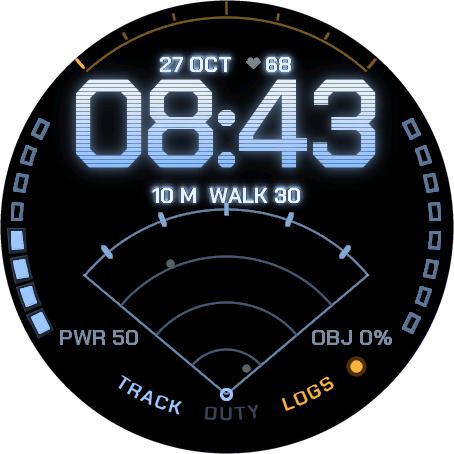
TRACK Time, sensor fan, contacts and range. PWR is your battery, OBJ your daily step goal.
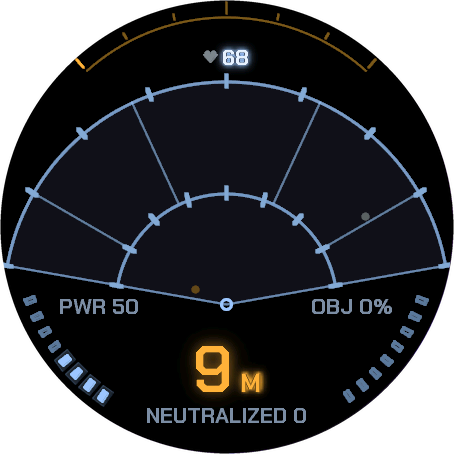
Full screen Hold the fan to fill the screen with the sensor.
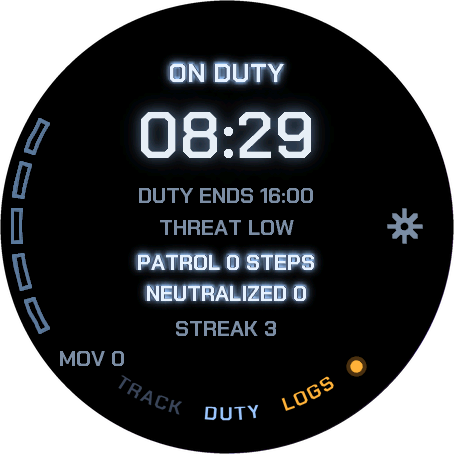
DUTY Your shift, today’s threat level and your patrol.
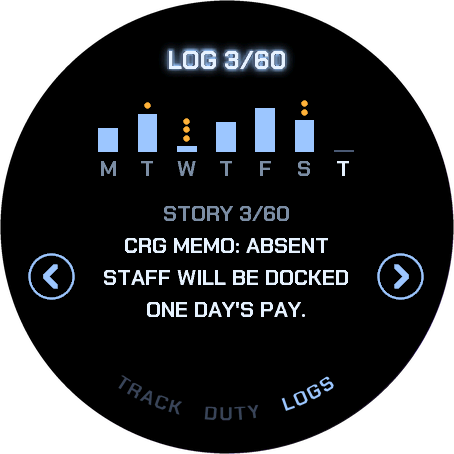
LOGS Your week, the stories you have recovered and the daily security report.
Corvane Resource Group
Colony Security Orientation
Issued to
Security Officer
Site
HX-217
Equipment
Colonial Watch motion tracker
Sensor range
60 m
Property of
CRG
Morale is mandatory
This orientation is the property of Corvane Resource Group. Do not copy it to personal devices. Do not read it aloud on C deck.
01_WELCOME
CRG MEMOTo: Security Officer, HX-217From: Colony AdministrationRe: Your first shift
Welcome memo
Officer, welcome to HX-217. Morale is mandatory.
You have been issued a Colonial Watch motion tracker. It is company property. Do not lose it, drop it in a duct, or let anything take it from you.
The tracker reads its wearer as well as the perimeter. A calm, active officer means a calm, active colony. Please be both.
Questions about missing staff should be directed to the headcount office, which is currently closed.
Have a productive shift. Colony Administration, Corvane Resource Group
Remote moon. Delayed mail. Late ship.
02_SITE
Site HX-217
HX-217 is a remote moon known only by its catalogue designation. Corvane Resource Group runs a mining colony here, with shift workers, their families and an ore plant. Around it runs a perimeter. Watching it is your job.
Site facts
Designation
HX-217
Operator
Corvane Resource Group
Population
Within acceptable variance
Messages to head office
Delayed
Relief ship
Delayed
Local wildlife
None on record
Company memos and shift reports sometimes disagree. In such cases, the memo is correct.
03_EQUIPMENT
Your tracker
The tracker shows the time first. Below it, a fan-shaped sensor field shows contacts and the range to the nearest one in metres. The pulse comes faster as they get closer. Under 10 m, the reading turns amber.
Contacts come in from the edge. During your shift, new contacts appear at the edge of the sensor’s range and close in while you sit, about a metre a minute. Stress, read from your heart rate, brings them more often.
Walking neutralizes them. Every 30 steps neutralizes the nearest contact: CONTACT NEUTRALIZED. In higher heart rate zones your steps count up to three times. An intensity minute counts as 30 steps.
Sitting too long speeds them up. Your watch’s own move bar makes contacts faster. Clear it with a walk and the nearest one is neutralized: PERIMETER CLEAR.
A breach is a note, not a punishment. A contact that reaches 0 m is logged as a BREACH. Nothing else happens. Rest and illness never count against you.
Always-On shows the time and the range only. Hold a tab name to switch views.
Sixty metres is closer than it sounds.
04_SHIFTS
Shift schedule
Shift rules
ON DUTY
An office day, 08–16 Monday to Friday by default. Pick your start time and days in the settings. New contacts arrive only on duty.
OFF DUTY
No new contacts, but your patrol still counts. An evening walk is never wasted.
Threat level
LOW, NORMAL or HIGH, set each day. It changes how often contacts arrive.
Day change
Four hours before your shift starts. Your day is filed as a security report.
Daily security report
Your report is written from your own numbers. Head office replies.
Four display palettes are approved for colony use: CRT Blue, Phosphor Green, Amber and Cyan.
Hold your shift. Read the logs.
05_LOGS
Incident logs
Colony systems keep talking: company memos, operations, maintenance, the medical bay and radio. Every shift you hold recovers another story on your tracker. 60 are on file. The first three are unrestricted. The rest need the clearance code your tracker shows above each story. Clearances stay in this browser, and a transfer link carries them to another one. No account needed.
Story 01
CRG MEMO
Officer, welcome to HX-217. Morale is mandatory.
Story 02
OPS
Night shift handover. Night shift absent.
Story 03
CRG MEMO
Absent staff will be docked one day's pay.
Story 04
Restricted entry.
Story 05
Restricted entry.
Story 06
Restricted entry.
Story 07
Restricted entry.
Story 08
Restricted entry.
Story 09
Restricted entry.
Story 10
Restricted entry.
Story 11
Restricted entry.
Story 12
Restricted entry.
Story 13
Restricted entry.
Story 14
Restricted entry.
Story 15
Restricted entry.
Story 16
Restricted entry.
Story 17
Restricted entry.
Story 18
Restricted entry.
Story 19
Restricted entry.
Story 20
Restricted entry.
Story 21
Restricted entry.
Story 22
Restricted entry.
Story 23
Restricted entry.
Story 24
Restricted entry.
Story 25
Restricted entry.
Story 26
Restricted entry.
Story 27
Restricted entry.
Story 28
Restricted entry.
Story 29
Restricted entry.
Story 30
Restricted entry.
Story 31
Restricted entry.
Story 32
Restricted entry.
Story 33
Restricted entry.
Story 34
Restricted entry.
Story 35
Restricted entry.
Story 36
Restricted entry.
Story 37
Restricted entry.
Story 38
Restricted entry.
Story 39
Restricted entry.
Story 40
Restricted entry.
Story 41
Restricted entry.
Story 42
Restricted entry.
Story 43
Restricted entry.
Story 44
Restricted entry.
Story 45
Restricted entry.
Story 46
Restricted entry.
Story 47
Restricted entry.
Story 48
Restricted entry.
Story 49
Restricted entry.
Story 50
Restricted entry.
Story 51
Restricted entry.
Story 52
Restricted entry.
Story 53
Restricted entry.
Story 54
Restricted entry.
Story 55
Restricted entry.
Story 56
Restricted entry.
Story 57
Restricted entry.
Story 58
Restricted entry.
Story 59
Restricted entry.
Story 60
Restricted entry.
06_REQUISITION
Equipment requisition
Runs on Garmin AMOLED watches: Epix (Gen 2) and Epix Pro, fēnix 8, 9 and E, Forerunner 265, 570, 965 and 970, Venu 2, 3 and 4, D2, Approach S70 and S72, Descent Mk3 and MARQ.
Works offline. Nothing leaves the watch.
Silent: no vibration, no sound
Four palettes, safe with Red Shift
Always-On shows the time and the range
Status Awaiting relief ship. Coming soon to the Garmin Connect IQ Store.